How to Airdrop Tokens to Multiple Wallets on Solmint
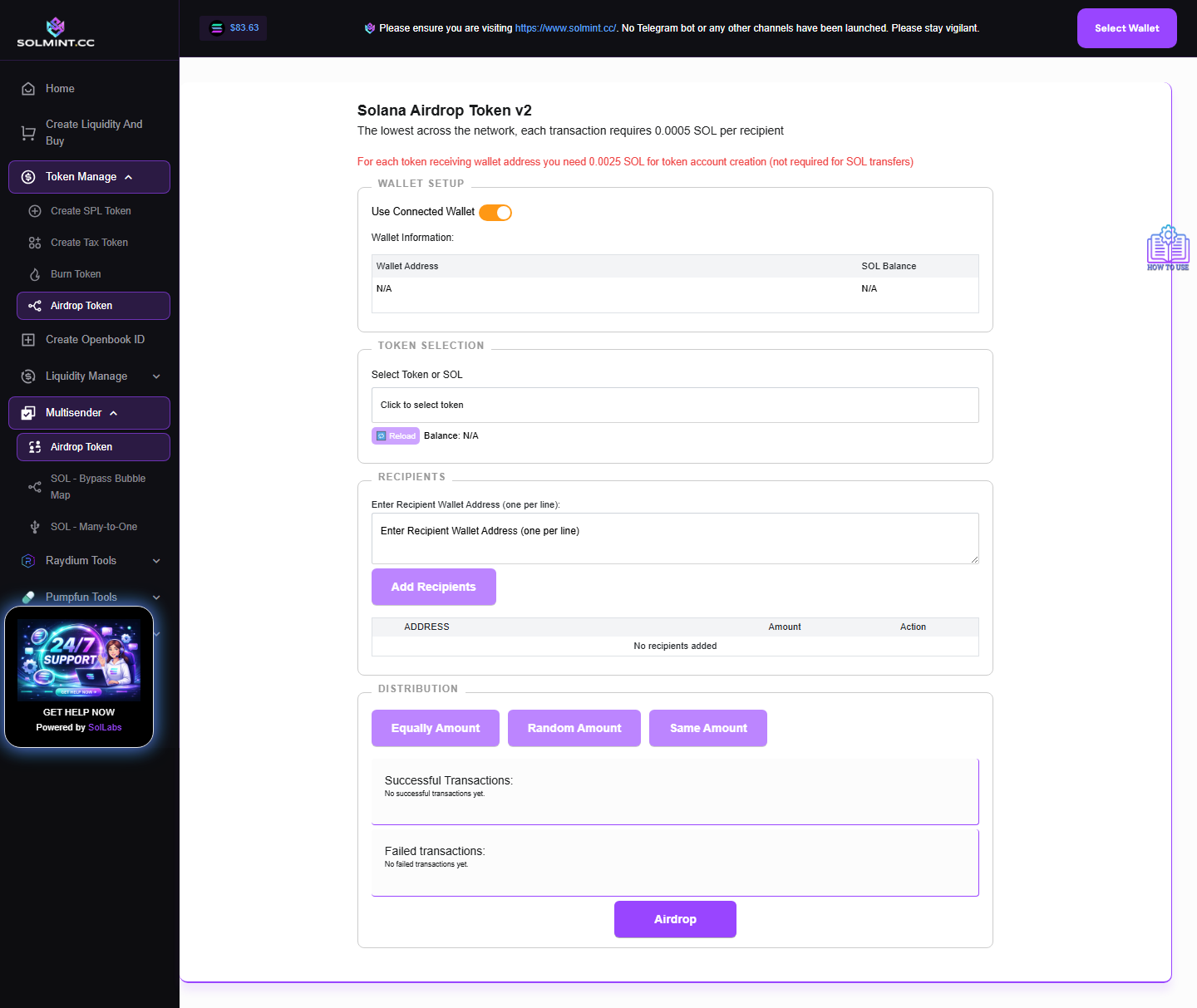
Send SOL or any SPL/Token-2022 token to multiple wallet addresses at once. Supports two wallet modes: connected browser wallet, or imported private key. Distribute amounts equally, randomly, or with the same fixed amount for all recipients.
How to Use
Step 1: Choose wallet mode:
- "Use Connected Wallet" (default): uses your browser-connected wallet.
- Toggle off to switch to "Private Key Mode": paste a base58 private key into the field. Your public key and SOL balance will be shown.
Step 2: Under TOKEN SELECTION, click the token dropdown. All tokens in your wallet are listed (including SOL at the top). Click to select the token or SOL you want to airdrop. Your balance is displayed.
Step 3: Under RECIPIENTS, paste recipient wallet addresses in the text area (one per line). Maximum: 200 recipients per airdrop. Click "Add Recipients" to validate and add them to the table. Invalid addresses are kept in the text area for correction. You can remove individual recipients using the "X" button.
Step 4: Set the amount for each recipient. Edit each row individually, or use the distribution buttons:
- "Equally Amount" — divides your total balance equally among all recipients.
- "Random Amount" — assigns random amounts (summing to your balance).
- "Same Amount" — opens a modal where you enter one fixed amount for everyone.
Step 5: Review the summary panel which shows: total address count, total tokens/SOL to send, estimated fee in SOL, and total SOL required.
Step 6: Click the "Airdrop" button to send all transactions.
Step 7: Wait for all batches to complete. Successful and failed transaction IDs are displayed with links to Solscan.
⚠️ Notes
- Service fee: 0.0005 SOL per recipient (platform fee).
- Additional costs for SPL token airdrops: ~0.0025 SOL per recipient for token account creation rent (only if recipient doesn't already have a token account).
- SOL airdrop batch size: 19 recipients per transaction.
- Token airdrop batch size: 5 recipients per transaction.
- Maximum 200 recipients per run.
- Make sure your wallet has enough SOL to cover both the sent amounts and all fees.
- Private key mode: your key is used locally — it is never sent to any server.