How to Create a Raydium CPMM Liquidity Pool on Solmint
Create a Raydium CPMM (Constant Product Market Maker) liquidity pool — the newest Raydium pool type. No OpenBook Market ID required. Lower creation fee. Supports Token-2022 (tax tokens). Multiple fee tier options available.
How to Use
Step 1: Connect your Solana wallet.
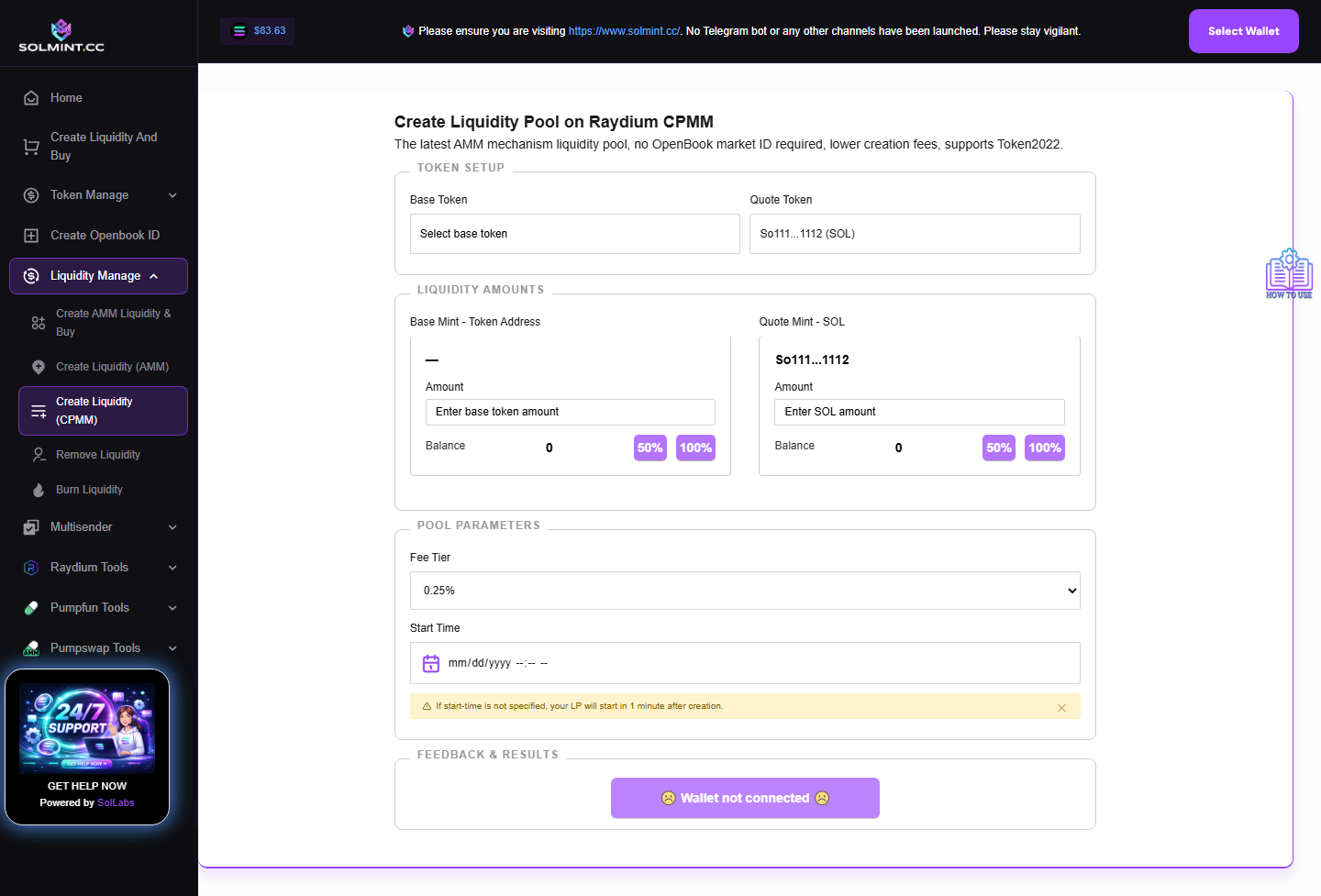
Step 2: Under TOKEN SETUP, click the "Base Token" input field to open the token dropdown. Select your token from the list (wallet tokens auto-loaded on connect). The "Quote Token" is fixed to SOL (cannot be changed).
Step 3: Under LIQUIDITY AMOUNTS, configure pool amounts:
- Base Token Amount: Enter how many tokens to deposit. Use "50%" or "100%" buttons.
- SOL Amount: Enter the amount of SOL to pair. Use "50%" or "100%" buttons.
Step 4: Select a Fee Tier (choose from dropdown):
- 0.25% | 0.3% | 0.5% | 1% | 1.5% | 2% | 4%
- This is the trading fee that liquidity providers earn on each swap.
Step 5: Set the Start Time using the datetime picker. The start time must be in the future — this sets when trading becomes active on the pool.
Step 6: Click "Create Liquidity Pool on Raydium CPMM".
Step 7: Approve the transaction in your wallet.
Step 8: Wait for confirmation. The transaction ID and pool keys will be displayed on success.
⚠️ Notes
- Service fee: Raydium CPMM pool creation fee (charged by Raydium protocol) + network fee. Typically lower than AMM v4 — approximately 0.15–0.2 SOL total.
- Does NOT require an OpenBook Market ID — simpler and cheaper than AMM v4.
- Supports Token-2022 (tax tokens) — use this for tax tokens instead of AMM v4.
- The start time cannot be in the past.
- Make sure both token and SOL balances are sufficient before submitting.