How to Create Token2022 Tax Token (Transfer Fee) on Solmint
Create a Solana token using the Token-2022 standard, which supports a built-in transfer fee (tax). A percentage of every transfer can be automatically collected as a fee, which can be withdrawn to a specified wallet.
How to Use
Step 1: Connect your Solana wallet.
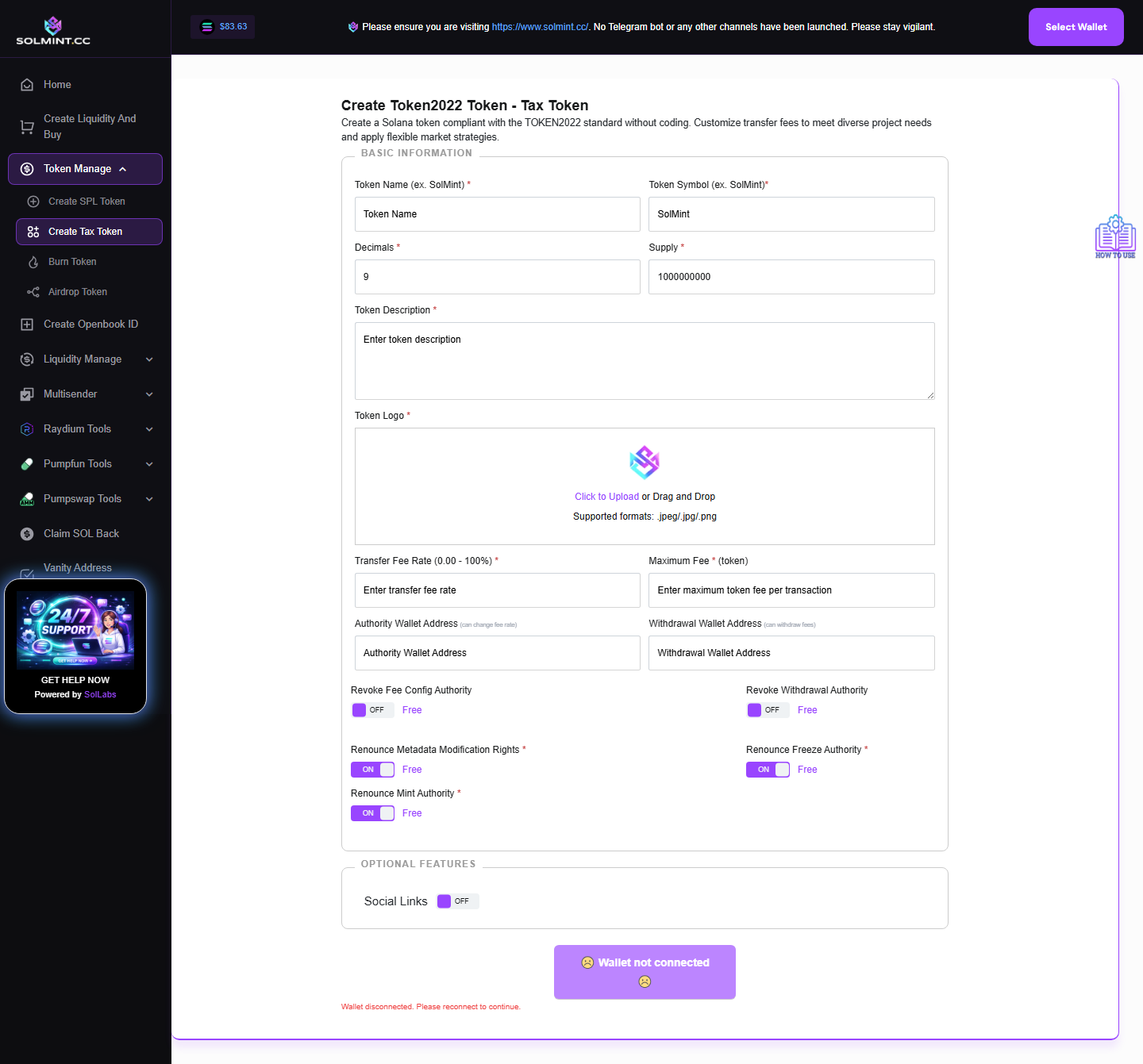
Step 2: Fill in BASIC INFORMATION (all required unless noted):
- Token Name (required) — e.g. "TaxToken"
- Token Symbol (required) — e.g. "TAX"
- Decimals (required, default: 9)
- Supply (required, default: 1,000,000,000)
- Token Description (required, shown in wallets)
- Token Logo (required): Upload .PNG/.JPG/.JPEG, max 500 KB
Step 3: Configure the Transfer Fee (required):
- Transfer Fee Rate (0.00–100%): Percentage deducted from each transfer. Example: Enter "5" for a 5% tax on every transfer.
- Maximum Fee (in tokens): The absolute maximum fee collected per transaction, regardless of transfer size. Example: Enter "1000" to cap at 1000 tokens per tx.
Step 4: Set Authority Wallets (auto-filled with your connected wallet):
- Authority Wallet Address: The wallet that can later change the fee rate. If "Revoke Fee Config Authority" is checked, this field is disabled and locked.
- Withdrawal Wallet Address: The wallet that can withdraw collected fees. If "Revoke Withdrawal Authority" is checked, this field is disabled and locked.
Step 5: Configure Authority Revocation (optional, all free):
- Revoke Fee Config Authority: If checked, the transfer fee rate is permanently locked at the initial value — IRREVERSIBLE.
- Revoke Withdrawal Authority: If checked, collected fees are locked in accounts forever (acts as automatic burn) — IRREVERSIBLE.
Step 6: Set Token Permissions (all checked by default, all free):
- Renounce Metadata Modification Rights: Locks token metadata forever.
- Renounce Freeze Authority: Prevents anyone from freezing token accounts.
- Renounce Mint Authority: Prevents minting additional supply.
Step 7: (Optional) Enable Social Links under OPTIONAL FEATURES — toggle the "Social Links" checkbox to reveal: Website, X (Twitter), Telegram, Other.
Step 8: Click the "Create Token" button.
Step 9: Approve the transaction in your wallet popup.
Step 10: Wait for confirmation. The final token address will be displayed on screen.
⚠️ Notes
- Service fee: Solana network rent (calculated at runtime) + standard transaction fee. No additional platform fee beyond network costs.
- Make sure your wallet has at least 0.05–0.1 SOL before starting.
- Token-2022 tokens are incompatible with some older DEX integrations (e.g., classic Raydium AMM v4). Use Raydium CPMM or PumpSwap for listing.
- All authority revocations are PERMANENT — double-check before clicking Create Token.
- Transfer fee is set in basis points internally (1% = 100 bps). Valid range: 0–100%.