How to Launch a Pump.fun Token with Bundle Buy on Solmint
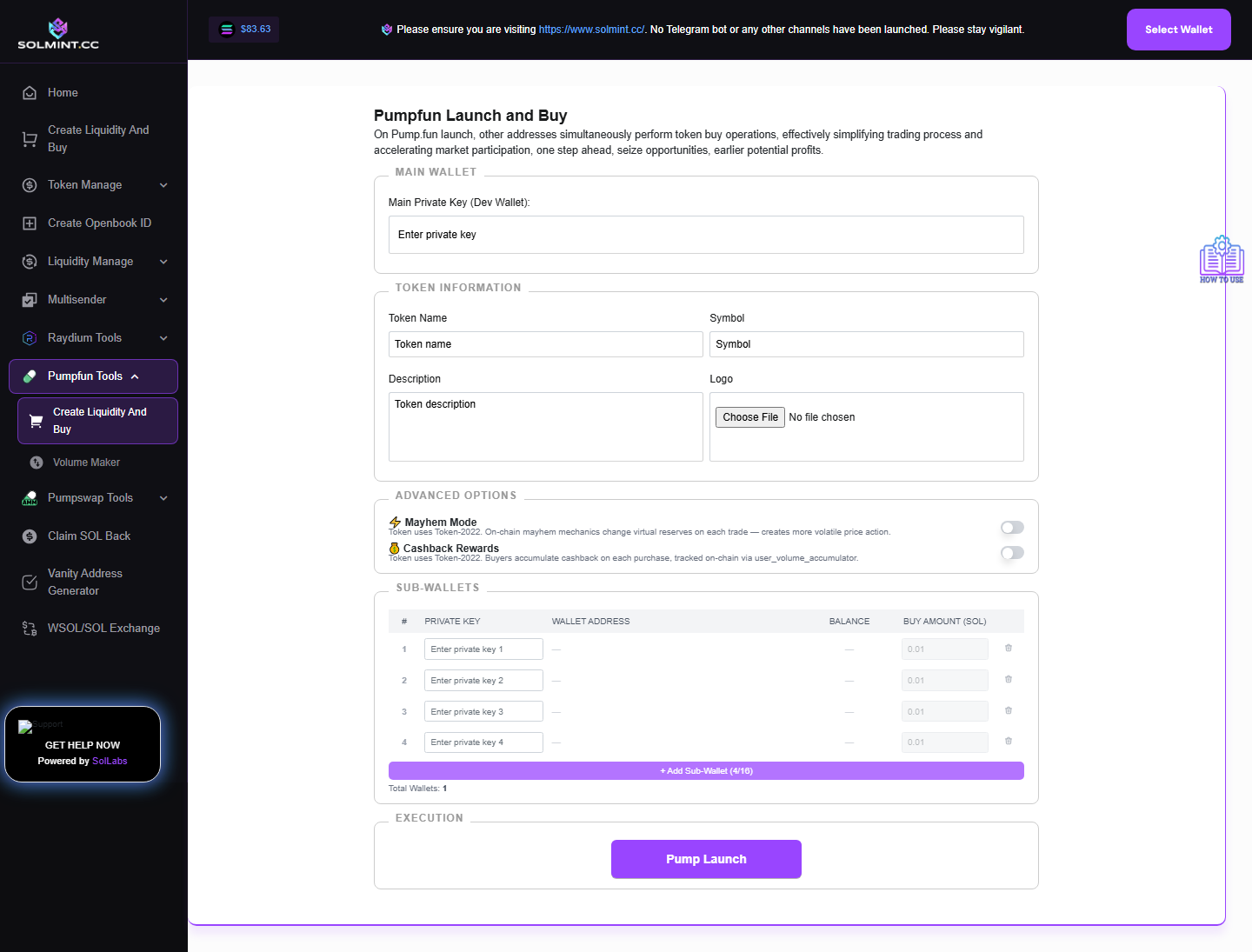
Launch a new token on Pump.fun AND simultaneously bundle-buy it from up to 16 additional sub-wallets in the same block. The main (dev) wallet creates the token and buys, while sub-wallets also buy atomically — maximizing initial holdings.
How to Use
Step 1: Under MAIN WALLET, enter the Dev Wallet Private Key (base58). Your wallet's public key and SOL balance are displayed automatically.
Step 2: Enter the Main Wallet Buy Amount (SOL) — how much SOL the dev wallet spends to buy tokens at launch.
Step 3: Fill in TOKEN METADATA:
- Token Name (required)
- Token Symbol (required)
- Token Description (required)
- Token Image: Upload a PNG file (required)
Step 4: (Optional) Enter a Mint Private Key if you want to use a specific mint address. If left blank, a random mint keypair is generated automatically.
Step 5: Under SUB-WALLETS, enter up to 16 additional wallet private keys. Each row shows: Private Key field, Public Key, SOL balance. Enter the Buy Amount (SOL) for each sub-wallet. Click "Add Sub-Wallet" to add more slots (up to 16 total). Click the trash icon to remove a sub-wallet.
Step 6: (Optional) Toggle "Mayhem Mode" for more aggressive bundling behavior.
Step 7: (Optional) Toggle "Cashback" if available (refund mechanism for fees).
Step 8: Review the "Total Wallets Count" shown at the bottom.
Step 9: Click the "Create and Batch Buy" button.
Step 10: Wait for the bundle to confirm. Results (token address, tx IDs) are displayed.
⚠️ Notes
- All transactions are sent via Jito bundle — the token creation and all sub-wallet buys happen atomically.
- Each wallet (main + sub) must have enough SOL for their buy amount + fees.
- Private keys are used locally — they are never sent to any server.
- Maximum 16 sub-wallets + 1 main wallet = 17 wallets total.
- This is specifically for Pump.fun tokens — not for Raydium or other DEXes.
- Ensure the main wallet has sufficient SOL for both the token creation fee (Pump.fun charges ~0.02 SOL) and the buy amount.